
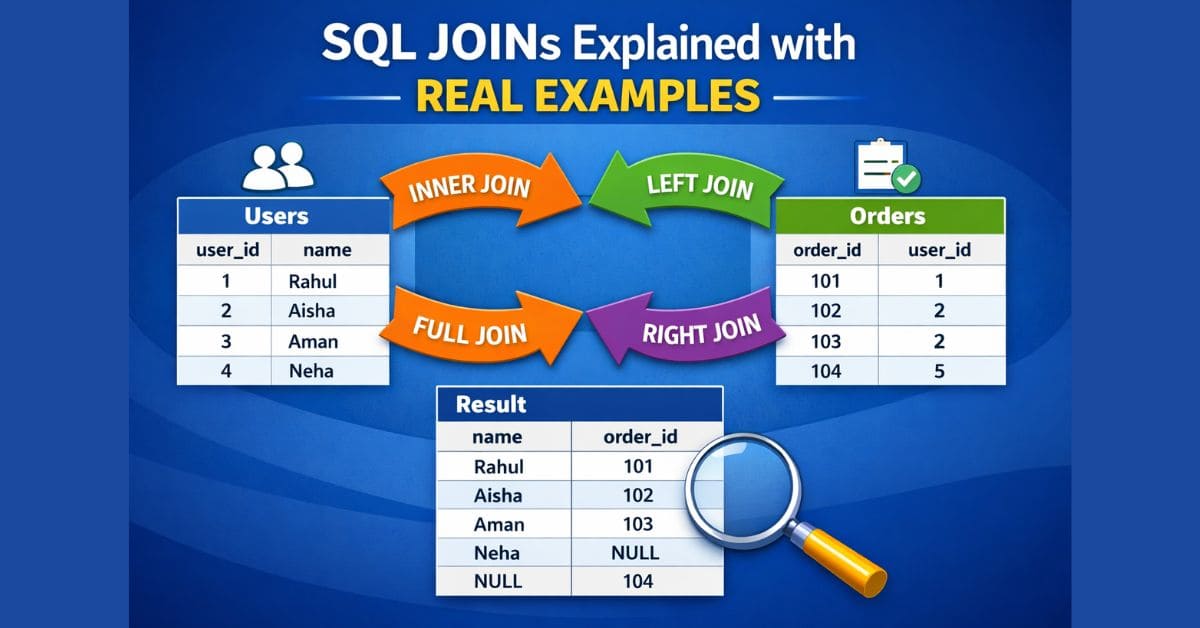
Understanding SQL JOINs is not about memorizing syntax.
It’s about knowing how tables relate and which data you want to fetch.
In this article, we’ll explain the most important SQL JOINs using real, readable data so you never get confused again.

Sample Tables (Used in All Examples)
Table A: users
| user_id | name |
|---|---|
| 1 | Rahul |
| 2 | Aisha |
| 3 | Aman |
| 4 | Neha |
Table B: orders
| order_id | user_id |
|---|---|
| 101 | 1 |
| 102 | 2 |
| 103 | 2 |
| 104 | 5 |
Important notes:
- User 3 & 4 never placed any order
- Order 104 belongs to a user that does not exist
What Is a SQL JOIN?

A JOIN combines rows from two tables using a related column (usually an ID).
Here:
- Common column =
user_id - Relation = users ↔ orders
INNER JOIN (Only Matching Data)
What It Does
Returns rows that exist in both tables.
Query
SELECT u.name, o.order_id
FROM users u
INNER JOIN orders o
ON u.user_id = o.user_id;
Result
| name | order_id |
|---|---|
| Rahul | 101 |
| Aisha | 102 |
| Aisha | 103 |
Explanation
- Only user_id 1 & 2 matched
- Aman, Neha ❌
- Order 104 ❌
👉 Common data only
LEFT JOIN (All Users, Orders If Available)
What It Does
- Keeps all rows from users
- Adds orders if found
- Uses
NULLif no order exists
Query
SELECT u.name, o.order_id
FROM users u
LEFT JOIN orders o
ON u.user_id = o.user_id;
Result
| name | order_id |
|---|---|
| Rahul | 101 |
| Aisha | 102 |
| Aisha | 103 |
| Aman | NULL |
| Neha | NULL |
👉 Left table = priority
LEFT JOIN + NULL Filter (Users Without Orders)
What It Does
Finds users who never placed an order.
Query
SELECT u.name
FROM users u
LEFT JOIN orders o
ON u.user_id = o.user_id
WHERE o.user_id IS NULL;
Result
| name |
|---|
| Aman |
| Neha |
👉 Very common in real reporting & audits
RIGHT JOIN (All Orders, Users If Available)
What It Does
- Keeps all rows from orders
- Adds user data if found
Query
SELECT u.name, o.order_id
FROM users u
RIGHT JOIN orders o
ON u.user_id = o.user_id;
Result
| name | order_id |
|---|---|
| Rahul | 101 |
| Aisha | 102 |
| Aisha | 103 |
| NULL | 104 |
Explanation
- Order 104 has no matching user
👉 Right table = priority
RIGHT JOIN + NULL Filter (Orders Without Users)
Query
SELECT o.order_id
FROM users u
RIGHT JOIN orders o
ON u.user_id = o.user_id
WHERE u.user_id IS NULL;
Result
| order_id |
|---|
| 104 |
👉 Finds orphan orders
FULL JOIN (Everything from Both Tables)
What It Does
Returns:
- All matching rows
- All unmatched rows from both tables
Query
SELECT u.name, o.order_id
FROM users u
FULL JOIN orders o
ON u.user_id = o.user_id;
Result
| name | order_id |
|---|---|
| Rahul | 101 |
| Aisha | 102 |
| Aisha | 103 |
| Aman | NULL |
| Neha | NULL |
| NULL | 104 |
👉 Complete data view
FULL JOIN + NULL Filter (Only Mismatched Data)
Query
SELECT u.name, o.order_id
FROM users u
FULL JOIN orders o
ON u.user_id = o.user_id
WHERE u.user_id IS NULL
   OR o.user_id IS NULL;
Result
| name | order_id |
|---|---|
| Aman | NULL |
| Neha | NULL |
| NULL | 104 |
👉 Used in data quality checks
One-Line JOIN Memory Rule
INNER → common data
LEFT  → left safe
RIGHT → right safe
FULL  → everything
NULL filter → missing data
Common JOIN Mistakes
- Using INNER instead of LEFT
- Filtering JOINed data in
WHERE - Forgetting how
NULLbehaves - Not defining primary table first

Final Thoughts
SQL JOINs are logic tools, not syntax tricks.
Once you know:
- which table is primary
- what data you want
- how NULL works
👉 80% SQL problems are solved automatically.
SQL JOINs combine rows from multiple tables based on related columns.
🔗 https://www.postgresql.org/docs/current/queries-table-expressions.html#QUERIES-JOIN
MySQL supports multiple JOIN types to retrieve related data efficiently.
Learn Web Development in 2026: The Ultimate Beginner-to-Pro Guide
How to Add Identity Verification to Your Web App (Complete Guide for Developers)